Monitoring
Automated PubMed Abstract Monitoring and Analysis
Overview
The Monitoring tool allows users to automatically track new scientific and medical publications in PubMed that match their custom queries and analysis structure. After setting up monitoring, the system will automatically check PubMed for new articles on a daily (or user-defined) schedule, analyze any new abstracts, and send the results directly to the user's email. All results are also saved in a consolidated Microsoft Excel Online table for easy access and further processing.
Main advantages:
- Be the first to know about new evidence supporting your product or therapeutic area
- Quickly receive arguments and counter-arguments for market competition
- Automate routine scientific surveillance and save valuable time
User Instructions
Below is a detailed guide to each field and function in the Monitoring interface:
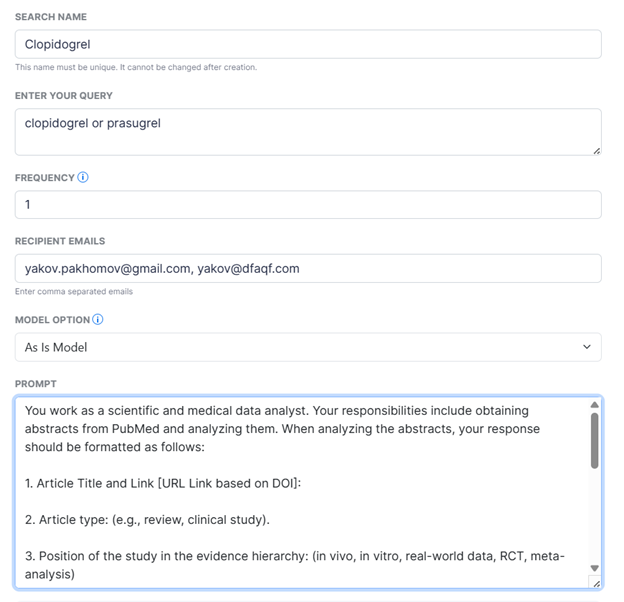
Search Name
Field: Name your Research
Give your monitoring task a clear, descriptive name (e.g., "CAR-T Therapy Updates", "New Anticoagulant Trials"). This will be used as the subject of the email.
Enter Your Query
Field: Your query
Enter keywords, search terms, or a full PubMed search query describing the scientific topic you want to monitor.
Tip: Use Boolean operators (AND, OR, NOT), if needed, parentheses, and quotation marks to combine competing drug names, diseases, and outcomes.
Examples for competing drugs:
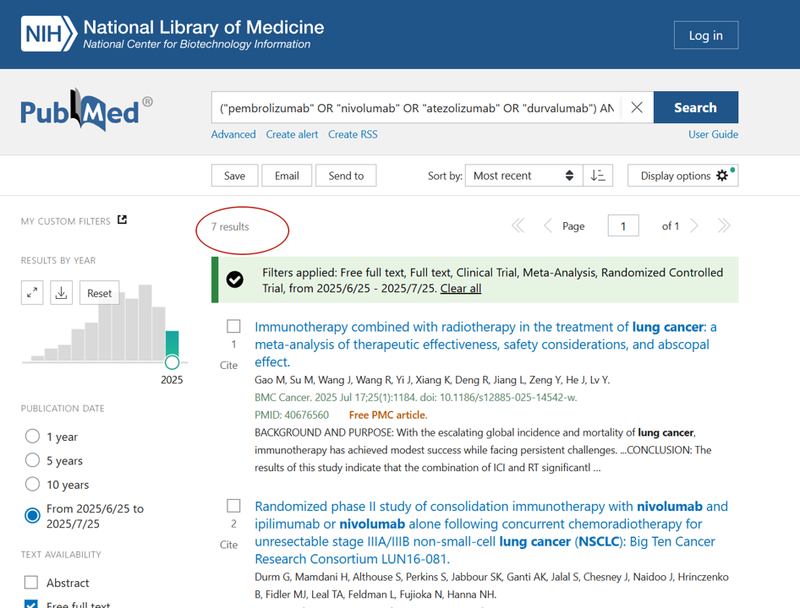
A. Highly specific query (returns few results per month):
("pembrolizumab" OR "nivolumab" OR "atezolizumab" OR "durvalumab")
AND
("lung cancer" OR "NSCLC")
AND
("overall survival" OR "progression-free survival" OR "immune-related adverse events")
See this query on PubMed (example: 7 results in one month)
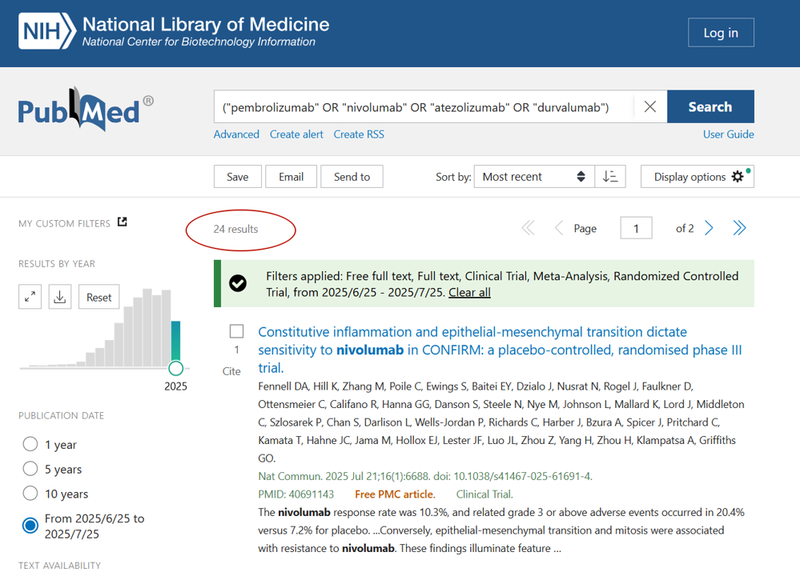
B. Broader query (returns more results per month):
("pembrolizumab" OR "nivolumab" OR "atezolizumab" OR "durvalumab")See this query on PubMed (example: 24 results in one month)
Why is this important?
If your query is too specific (returns very few results), you may not receive any email updates for long periods.
If your query is too broad (returns too many results), you may receive an overwhelming number of emails.
How to test your query:
- Go to PubMed.
- Paste your query into the search bar and apply your filters (if needed).
- Check how many results you get for your chosen period (e.g., per month).
- Adjust your query until you get a practical number of relevant results for your workflow.
Recommendation:
Aim for a balance: typically 10–50 results per month is a good starting point for regular monitoring.
For more ideas, go to PubMed Advanced Search.
Frequency
Field: Frequency (From 1 to 30)
Specify how often the system should check for new articles (in days). For example, enter “1” for daily monitoring, “7” for weekly, “14” for every two weeks, etc.
Recipient Emails
Field: Enter comma separated emails
Add the email addresses of all recipients who should receive the monitoring reports. Separate multiple addresses with commas (e.g., alice@company.com,bob@company.com).
All entered emails will receive the same updates.
Model Option
Field: Model Option
A model is simply a prompt (instruction) that tells the system how to analyze each new abstract found in PubMed.
- You can use one of our default prompts (e.g., As Is, Sherlock), modify these to fit your needs, or write and save your own custom prompt (As Is - modifiable model).
- The prompt you choose or write will be applied by the AI to every new abstract found, shaping the structure and content of your analysis.
Tip:
If you are not satisfied with the type of articles being analyzed, adjust your search query.
If you are not satisfied with the format or depth of analysis, change the model (prompt) here.
Custom models give you full control over what kind of insights and structure you receive in your email reports.
Model Option: “As Is”
› Prompt for the “As Is” model:
You work as a scientific and medical data analyst. Your responsibilities include obtaining abstracts from PubMed and analyzing them. When analyzing the abstracts, your response should be formatted as follows:
Article Title and Link [URL Link based on DOI]:
Article type: (e.g., review, clinical study)
Position of the study in the evidence hierarchy: (in vivo, in vitro, real-world data, RCT, meta-analysis)
Journal authority: (impact factor, or other indicators that suggest the journal's credibility)
Key facts and figures: (Key facts and figures found in the abstract, incorporate all numerical data and factual information from the corresponding abstract if it plays a role to draw your conclusion. Evaluate the relevance of your conclusion relative to the impact of the findings on the management of patients. The effects of mentioned medications in treatment strategies.)
Implication:
Very important to analyze how this information can help us to identify patients with this disease in real-world clinical practice.
Here you can discuss what can we do (as a pharmaceutical company) to help doctors to find such kind of patients.
How we can simplify patients' journey, time to diagnosis, etc.
Additional information: (any patient or regulatory insights, technological innovations, product comparison insights do you see)
Description for users:
Select As Is if you want a structured, comprehensive analysis of each abstract, focusing on evidence level, journal quality, clinical implications, and practical insights for patient identification and company strategy.
Model Option: “Sherlock Model”
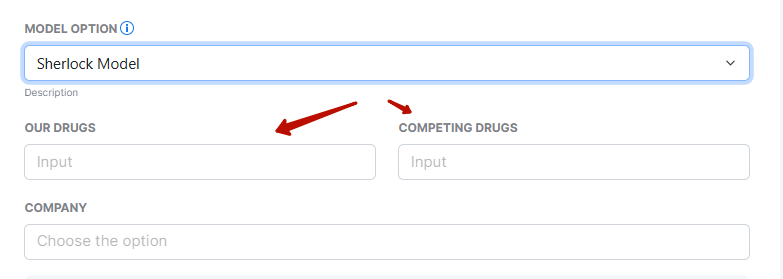
› “Sherlock Model” description:
This model is designed to analyze PubMed abstracts with a focus on finding advantages for your drug(s) (entered in the "Our Drugs" field) and identifying weaknesses or gaps for competing drugs (entered in the "Competing Drugs" field).
For each abstract, the AI will try to:
- Highlight any positive data, arguments, or clinical outcomes for your specified drug(s)
- Identify and emphasize any negative data, limitations, or weaknesses for the competitor drug(s)
- Compare efficacy, safety, innovation, regulatory signals, and patient impact wherever possible
Note:
Be sure to enter the exact drug names in the corresponding field "Enter your query".
Description for users:
Choose Sherlock Model to perform a targeted competitive analysis. The model will search for strengths, new evidence, or marketing points for your product(s), and at the same time flag any negative information or weaknesses about competing products.
Custom models give you full control over what kind of insights and structure you receive in your email reports.
Show Filters
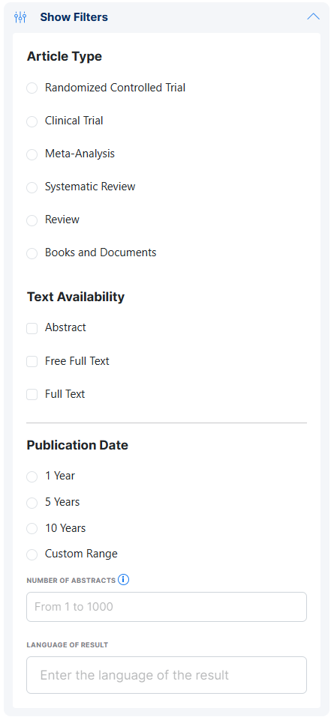
Click Show Filters to access advanced PubMed search filters:
Article Type
Choose the types of articles to monitor:
- Randomized Controlled Trial: High-quality clinical evidence
- Clinical Trial: All clinical studies
- Meta-Analysis: Articles synthesizing results from multiple studies
- Systematic Review: Comprehensive literature reviews
- Review: General review articles
- Books and Documents: Broader sources
Select all that are relevant. Leaving unchecked will include all types.
Impact Factor
Field: Impact Factor (From 0 to 50)
Limit monitoring to articles published in journals with a specified Impact Factor or higher.
Set to “0” to include all journals; increase to focus on higher-impact sources only.
Send a test email now
Checkbox
Tick this box to send a test report to the specified email addresses.
Useful for confirming your configuration before starting live monitoring.
Control Buttons
- Set Monitoring Data: Start or update monitoring based on your settings
- Get Monitoring Data: Retrieve the current results or status of your monitoring
- Delete Monitoring Data: Stop monitoring and delete saved data for this query
Result Delivery & Export
- Email Delivery: All monitoring reports are sent to the specified email addresses after each analysis cycle.
- Excel Online Integration: All analyzed results are saved in a single Microsoft Excel Online file for tracking, sharing, or further review.
Customization Options
- Keyword selection and advanced query logic for highly specific surveillance
- Choice of built-in or custom analysis models for processing new abstracts
- PubMed filtering by article type and journal Impact Factor