Research
Automated Literature Review and Scientific Search Tool
The Research tool is designed to quickly generate a comprehensive literature review based on your query. It searches both PubMed and authoritative open-access scientific medical web sources, then compiles the results into a structured review with references (MLA format) and clickable links to original full-text sources when available.
Key features:
- Flexible choice of search sources (PubMed, Web, or both)
- Advanced filtering by article type, publication date, text availability, and more
- Adjustable search depth (number of abstracts to analyze)
- Export to Microsoft Word Online for further use or editing
- Option to include all material and queries used in the review for transparency
Benefits for the User
- Obtain in-depth, structured answers to complex questions in minutes.
- Save time on manual searching and reading.
- Ensure transparency and reproducibility with a complete source list and search history.
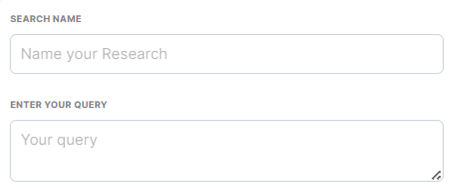
Search Name
Field: Name your Research
Enter a short, descriptive name for your research project or topic (e.g., “Recent Advances in Type 2 Diabetes Treatment”).
This will help you identify your search and organize your results.
Enter Your Query
Field: Your query
Write your main research question or keywords like in chat-gpt (e.g., “gut microbiome and depression”, “novel anticoagulants atrial fibrillation”).
Be as specific as possible to get relevant results
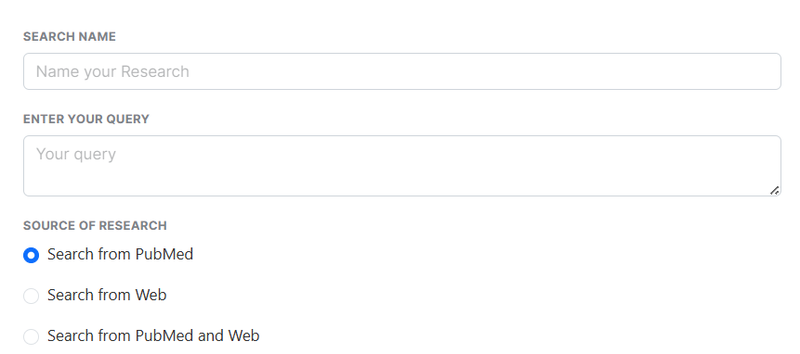
Source of Research
- Search from PubMed: Only search the PubMed database (peer-reviewed biomedical literature).
- Search from Web: Only search authoritative open-access scientific and medical web sources.
- Search from PubMed and Web: Combine both sources for a broader result.
Choose the option that best fits your needs. PubMed is recommended for highly scientific or clinical topics.
Filters
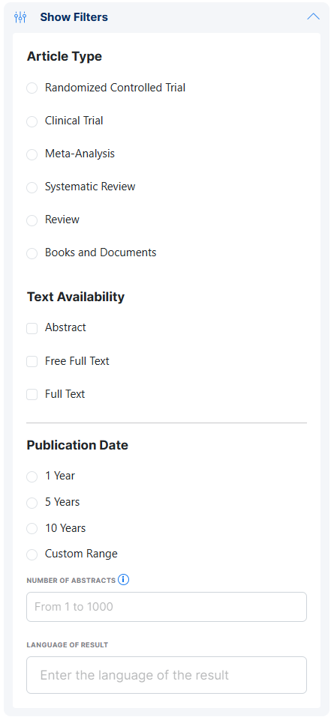
Click Show Filters to access advanced search options:
Article Type
Select one or more article types to focus your results:
- Randomized Controlled Trial: Original studies comparing interventions, considered the gold standard in clinical research.
- Clinical Trial: Includes all types of clinical trials.
- Meta-Analysis: Studies that statistically combine results from multiple studies.
- Systematic Review: Comprehensive reviews of the literature following a specific methodology.
- Review: General reviews and summaries.
- Books and Documents: Broader documents or book chapters.
Choose the type(s) most relevant to your research. Leaving all unchecked will search all types.
Text Availability
- Abstract: Show articles with an abstract available.
- Free Full Text: Limit results to articles where the full text is freely accessible.
- Full Text: Show articles where the full text is available (may require subscription).
Select as needed if you want only open-access or full articles.
Publication Date
Limit results by how recently the articles were published:
- 1 Year: Only the latest research.
- 5 Years: Recent advances.
- 10 Years: Broader but still recent.
- Custom Range: Specify your own date range.
Number of Abstracts
Enter the maximum number of abstracts to include in your analysis (from 1 to 1000).
Larger numbers provide a broader analysis but may take longer.
Language of Result
Specify the output language for your review (e.g., “English”, “French”).
This determines the language of your summary and exported document.
Additional Options
- Add sources to the result:
Check this box to include a detailed bibliography and all PubMed queries used in your report.
Start Analysis
Click Start Analysis to begin the automated search and analysis.
Your structured literature review will be generated based on the criteria and filters you set.
Output
- Results can be exported directly to Microsoft Word Online.
- All cited sources include clickable links (where available) to the original publications.