PubMed
Search and Automated Analysis of PubMed abstracts
Overview
The PubMed tool allows you to search and analyze previously published articles and abstracts in PubMed. Unlike the Monitoring feature, which tracks new publications over time, the PubMed function is designed for instant, in-depth analysis of existing literature based on your chosen query and filters.
The results are automatically analyzed according to your selected model (prompt/template), sent directly to your email, and saved in a consolidated Microsoft Excel Online file for further review.
Key Customization Feature
Keyword Selection
Analysis Model Selection
Create and Save Custom Analysis Models
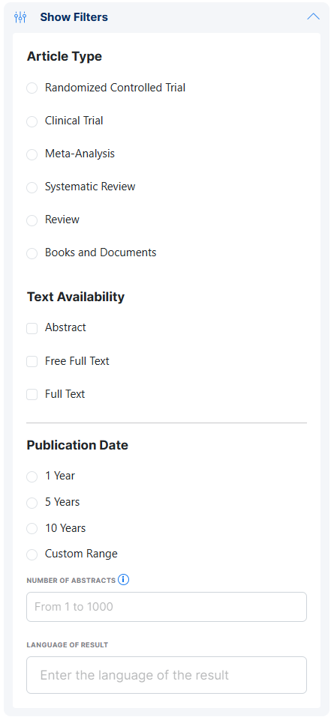
PubMed-Style Filters
Apply filters similar to PubMed, including article type, publication date range, text availability, and more. More info.
Impact Factor Filter
Result Delivery & Export
- All analyzed results are saved in a single Microsoft Excel Online spreadsheet, making it easy to review, sort, or use in other projects.
Main Advantages
- Instant screening and in-depth analysis of PubMed abstracts using your template and requirements.
- Ideal for finding scientific content to create presentations, articles, and highlight key messages and arguments.
- Saves significant time for medical affairs, scientific communication, and commercial teams.
User Instructions
1. Search Name
Enter a clear name for your search project (e.g., "Immunotherapy in Melanoma - 2024 review").
2. Enter Your Query
- More info is here
- Use precise keywords, Boolean operators, and combinations relevant to your research (see above examples for query construction).
- Test your query on PubMed to ensure a reasonable number of results for analysis.
3. Filters
- Set filters for article type (RCT, meta-analysis, review, etc.), publication date, text availability, and more.
- Specify Impact Factor if you want to restrict to high-impact journals.
4. Model Option
- Select how the analysis should be performed: choose a built-in model (such as As Is or Sherlock) or write your own prompt for custom analysis.
- You can further tailor the model by specifying drugs/products or competitive focus if the model allows (e.g., Sherlock Model).
5. Result Delivery
- The result will also be saved in a unified Microsoft Excel Online table for reference and further processing.
Tips for Best Use
- If you need highly specific, actionable insights for business or medical strategy, tailor your search query and prompt accordingly.
- Use the PubMed tool for quick content screening, competitor analysis, evidence mapping, or content curation for medical/scientific writing.
- Adjust your prompt/model if you need a different format, summary style, or focus for your reports.